Never Double-Book
Never Miss a Job
Visual calendar built for contractors. Drag jobs to reschedule. See your week at a glance. Set recurring maintenance. Stop juggling paper diaries.
Start Free Trial →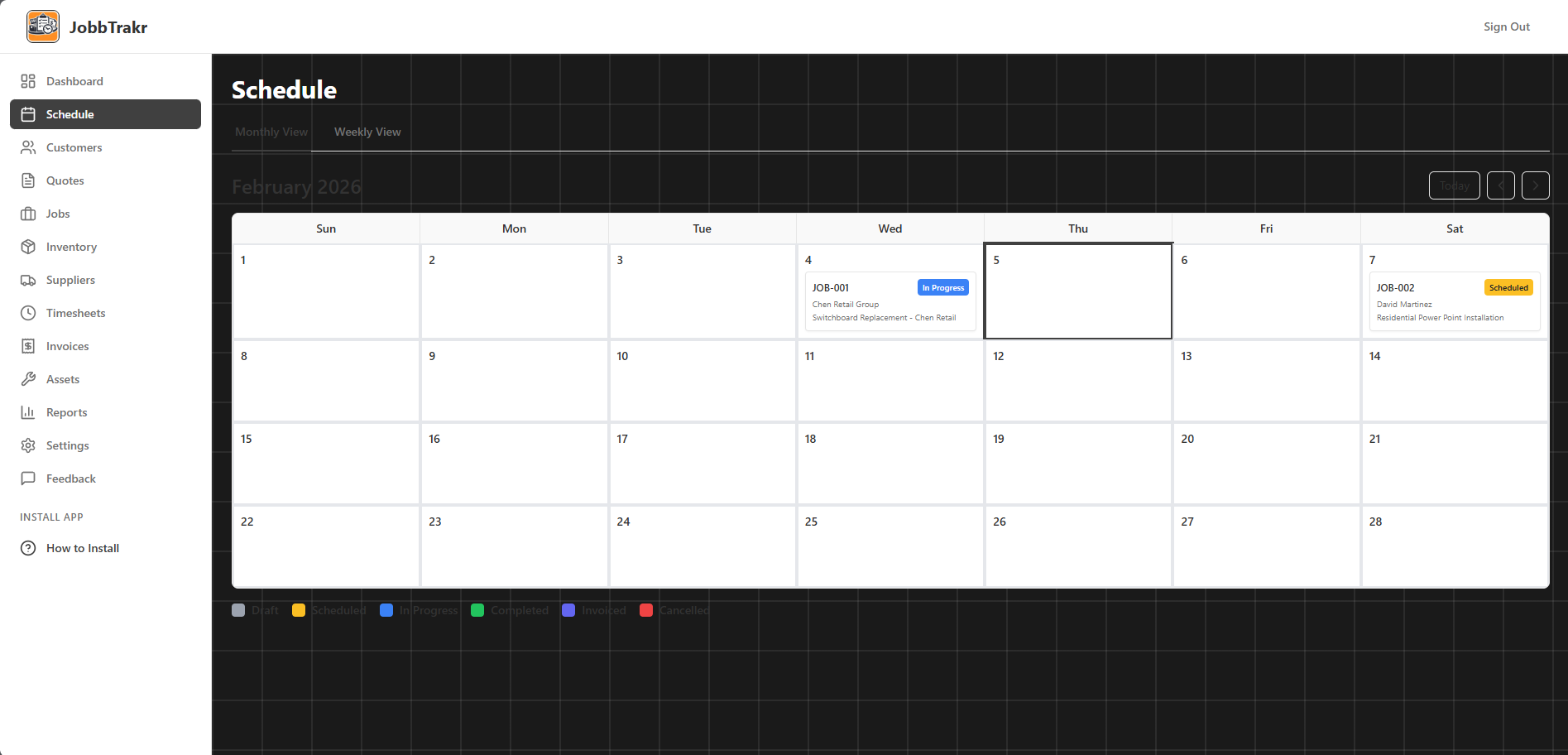
Everything in Scheduling
- Daily view
Detailed look at today or any specific day. Perfect when you're planning tomorrow.
- Weekly view
See the whole week at once. Best for coordinating team schedules.
- Monthly view
Big picture planning. See how busy next month looks. Plan capacity.
- Create jobs direct from calendar
Click a date, create a job. Don't have to go to the jobs page first.
- Color-coded job statuses
Blue for scheduled, orange for in progress, green for done. See everything at a glance.
- Status legend
Forget what the colors mean? Legend is right there on the calendar.
- Jump to jobs from calendar
See a job on the calendar, click it, full job details open up.
- Filter by job status
Only want to see completed jobs? Or just what's scheduled? Filter it.
- Search jobs in calendar
Can't remember when that Smith job was? Search for it.
- Mark days unavailable
Taking a holiday? Block out those dates so you don't schedule work by mistake.
Scheduling That Actually Works
Drag & Drop Calendar
Click a job. Drag to new date. Done. No forms. No re-entering data. Visual scheduling.
Multiple Views
Day view for detailed planning. Week view for team coordination. Month view for capacity planning.
Color Coding
Scheduled (blue), In Progress (orange), Complete (green). See job status instantly.
Recurring Jobs
Weekly pool service? Monthly HVAC checks? Set once, auto-schedules forever.
Block Unavailable Dates
Holidays, training, personal time. Block dates so you don't accidentally schedule work.
Time Slots
Morning job, afternoon job, all-day job. Schedule multiple jobs per day without conflicts.
From Quote to Scheduled Job in 3 Clicks
Customer Accepts Quote
They approve your quote. You click "Convert to Job". Quote details become job details automatically.
Open Calendar
Click "Schedule" on the job. Calendar opens. You see your existing schedule and available slots.
Click Date, Done
Click the date you want. Job appears on calendar. Customer gets confirmation email. You're booked.
View Your Schedule Your Way
Day View
Hourly slots. See exactly when each job starts and ends.
- • 8am - Job A (4 hours)
- • 1pm - Job B (3 hours)
- • Travel time shown
Week View
See your full week. Perfect for team coordination.
- • Mon: 3 jobs scheduled
- • Tue: 2 jobs + 1 quote
- • Spot gaps, fill slots
Month View
Big picture planning. Capacity forecasting.
- • Busy weeks vs slow weeks
- • Plan holidays/time off
- • See recurring patterns
Recurring Jobs: Set Once, Schedule Forever
How Recurring Jobs Work
- 1. Create job template (e.g., "Monthly Pool Service for Smith residence")
- 2. Set frequency (Weekly / Every 2 weeks / Monthly / Quarterly / Yearly)
- 3. Set start date (e.g., First Monday of each month)
- 4. Jobs auto-generate on calendar. No manual scheduling ever again.
Perfect For:
- • Pool maintenance (weekly/fortnightly)
- • HVAC servicing (annual/quarterly)
- • Lawn mowing (weekly in summer)
- • Fire alarm testing (6-monthly)
- • Gutter cleaning (seasonal)
Automatic Features:
- • Appears on calendar automatically
- • Customer reminders sent
- • Invoices created after completion
- • Payment history tracked
- • Pause/resume anytime
Check Your Schedule
From Anywhere
Forgot tomorrow's address? Open calendar on your phone. See job details, customer contact, site notes. Everything you need in the field.
- Real-time sync across devices
- Navigate to job from calendar
- Call customer with one tap
- Update job status on-site
Conflict Detection: Never Double-Book Again
Try to schedule two jobs at the same time? JobbTrakr warns you. You see the conflict before confirming. No awkward customer calls.
Example: You try to schedule "Kitchen Renovation" on Tuesday 9am. You already have "Bathroom Plumbing" at Tuesday 9am. System shows: "Conflict detected with existing job." Pick new time.
Schedule Smarter. Work Better.
Visual calendar. Recurring jobs. Mobile access. Never double-book.
Start Scheduling Free →